AI is changing the way students study, research, write, create presentations, learn new subjects, and prepare for exams. But with hundreds of AI tools available today, finding the right ones can be confusing.
Some AI tools are excellent for explaining difficult topics. Others are better for research, note-taking, writing, coding, presentations, revision, or productivity.
In this guide, we have put together 25+ of the best AI tools for students in 2026, with a simple explanation of what each tool does and where it can actually help.
The goal isn’t to encourage students to let AI do all their work. The goal is to use AI as a smart study partner that saves time while helping you understand things better.
Important: Always follow your school’s or university’s rules about AI. Use AI to support your learning, check important information yourself, and don’t submit AI-generated work as your own when your institution does not allow it.
Why Are AI Tools Useful for Students?
Student life can be busy.
Between lectures, assignments, projects, exams, presentations, research papers and personal responsibilities, it can sometimes feel like there aren’t enough hours in the day.
This is where AI can be useful.
The right AI tool can help you:
- Understand difficult concepts
- Summarize long study material
- Create practice questions
- Organize notes
- Find research sources
- Improve grammar and writing
- Brainstorm ideas
- Prepare presentations
- Practice coding
- Create flashcards
- Prepare for exams
- Manage study tasks
- Turn complicated information into simpler explanations
However, there is an important difference between using AI to learn and using AI to avoid learning.
A good approach is to ask AI to explain a concept, challenge your thinking, create practice questions, or review your work rather than simply asking it to complete an assignment from start to finish.
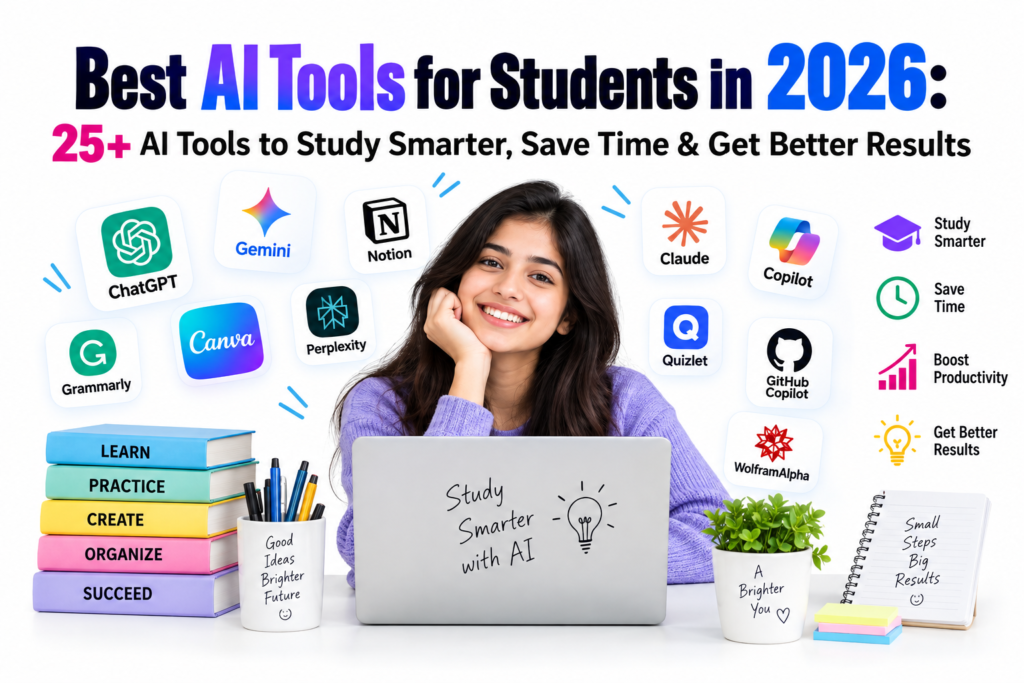
25+ Best AI Tools for Students in 2026
Here are some of the most useful AI tools students can explore in 2026.
1. ChatGPT — Best Overall AI Tool for Students
ChatGPT is one of the most versatile AI assistants available to students.
You can use it to understand difficult subjects, brainstorm ideas, create study plans, practice questions, review writing, analyze information, work through problems and much more.
One of the best ways to use it is as a personal tutor.
Instead of asking:
“Give me the answer.”
Try:
“Explain this concept step by step and then give me three questions to test whether I understood it.”
That small change can turn AI from an answer generator into a learning assistant.
Best for: General study help, explanations, brainstorming, writing, problem solving and exam preparation.
2. Google Gemini — Great for Students Using Google Services
Google Gemini can be useful for students who already work heavily with Google’s ecosystem.
Depending on the available features and account type, students can use Gemini for studying, writing, brainstorming, research, analyzing information and working with learning materials.
Google has also been expanding its education-focused AI features, including personalized study experiences, quizzes and study notebooks.
Best for: Studying, research, brainstorming and students already using Google Workspace.
3. Gemini Notebook — Best for Studying Your Own Materials
If you have lecture notes, PDFs, course materials or other study documents, Gemini Notebook can be especially useful.
You can upload your sources and ask questions about them. It can help create summaries, flashcards, quizzes and other study materials based on those sources.
Google describes Gemini Notebook as the continuation of NotebookLM, with features designed around studying and working with your own material.
Imagine uploading your notes before an exam and asking:
“Create a 20-question practice test from these notes. Don’t show the answers until I finish.”
That can be much more useful than simply reading the same notes again.
Best for: Notes, PDFs, revision, source-based questions and exam preparation.
4. Claude — Great for Writing and Deep Explanations
Claude is another powerful AI assistant that can be useful for students.
It can help with brainstorming, explaining concepts, analyzing long passages, reviewing writing and organizing complicated information.
For students who are working on essays, reports or research-related tasks, Claude can be useful as a second perspective.
Best for: Writing, analysis, brainstorming and understanding complex information.
5. Perplexity — Best for AI-Assisted Research
Research often means opening dozens of browser tabs and trying to figure out which information is reliable.
Perplexity is designed around AI-powered search and provides sources alongside its answers, making it useful for discovering information and following up on references.
It can be especially helpful during the early research stage of an assignment.
However, don’t blindly trust any AI-generated answer. Open the cited sources and verify important facts yourself.
Best for: Research, source discovery and quick fact-finding.
ALSO CHECK OUR OTHER TOOLS…..
6. Grammarly — Best for Improving Writing
Good ideas can lose their impact when writing is unclear or filled with grammar mistakes.
Grammarly can help students improve grammar, spelling, clarity, tone and overall writing quality.
Instead of asking an AI to write your entire essay, you can write your own draft first and then use a writing assistant to identify areas that need improvement.
That keeps your own ideas and voice at the center of the work.
Best for: Essays, emails, assignments, grammar and proofreading.
7. QuillBot — Useful for Editing and Paraphrasing
QuillBot is widely used for writing assistance and paraphrasing.
Students can use it to improve sentence structure, make writing clearer and explore different ways to express an idea.
But paraphrasing should not be used to disguise copied material. If an idea comes from another source, students should still cite that source properly.
Best for: Editing, paraphrasing and improving sentence structure.
8. Canva AI — Best for Presentations and Visual Projects
A presentation doesn’t have to look like a wall of text.
Canva’s AI-powered features can help students create presentations, graphics, posters, visual study materials and other creative projects.
This is particularly useful for students who need to turn research into something visually engaging.
The important part is still the student’s job: deciding what information matters and making sure the final presentation is accurate.
Best for: Presentations, posters, infographics and visual projects.
9. Microsoft Copilot — Useful for Microsoft 365 Students
Students who regularly use Microsoft products may find Copilot useful for productivity and document-related tasks.
It can assist with writing, brainstorming, summarization and other workflows depending on the Microsoft product and account available.
Best for: Microsoft-based study and productivity workflows.
10. GitHub Copilot — Best for Coding Students
Learning programming can involve a lot of debugging and repetitive work.
GitHub Copilot can help programmers write and understand code, suggest code completions and explore possible solutions.
For students, the best use is not simply copying the suggested code.
Ask:
“Explain why this code works.”
or:
“Find the bug and explain what caused it.”
That way, you learn the programming concept instead of simply accepting the answer.
Best for: Programming, debugging and learning software development.
11. Khanmigo — AI Learning and Tutoring Assistant
Khanmigo is designed around learning and tutoring rather than simply producing answers.
A tutoring-style AI can be particularly useful when you are stuck on a math or academic problem and need guidance.
The ideal approach is to let it guide you through the reasoning.
Best for: Tutoring, guided learning and practicing academic concepts.
12. Quizlet — Best for Flashcards and Revision
Sometimes the simplest study technique is still one of the most effective: active recall.
Quizlet can help students create and practice flashcards and other revision materials.
Instead of reading the same chapter five times, you can test yourself repeatedly and identify the topics you still don’t understand.
Best for: Flashcards, memorization and revision.
13. Notion AI — Best for Organizing Student Life
Students often have information scattered across notebooks, documents, apps and random pieces of paper.
Notion can help bring notes, tasks, projects and study information into one organized workspace, while its AI features can assist with tasks such as summarization and writing.
Best for: Notes, organization, project planning and productivity.
14. Elicit — Useful for Academic Research
Finding academic literature can be one of the hardest parts of writing a research paper.
Elicit is designed to help with literature discovery and research workflows.
It can help students find relevant papers and organize information during the early stages of academic research.
Best for: Literature reviews and academic research.
15. Gamma — Great for Creating Presentations
Not every student enjoys designing slides.
Gamma can help turn ideas or written material into structured visual presentations.
It can be useful when you already understand your topic but need help organizing it into a presentation format.
Best for: Presentations, project slides and visual storytelling.
16. Otter.ai — Useful for Lecture Notes and Transcription
Students sometimes struggle to take notes while listening to a fast lecture.
AI transcription tools such as Otter.ai can help turn spoken content into searchable text and organized notes.
Before recording a lecture, however, make sure you understand and follow your school’s, university’s and instructor’s rules about recording.
Best for: Lecture transcription, meeting notes and reviewing spoken information.
17. Speechify — Helpful for Reading and Listening
Sometimes you simply don’t want to stare at another page.
Speechify can convert written content into audio, allowing students to listen to documents and other reading material.
This can be useful when reviewing notes or going through reading material while commuting or taking a break from the screen.
Best for: Listening to written material and accessibility-focused reading.
18. Wolfram Alpha — Great for Mathematics and Calculations
Mathematics students often need more than a final answer.
Wolfram Alpha can be useful for calculations, mathematical concepts, equations and data-related questions.
Use it as a way to check your reasoning rather than simply copying the result.
Best for: Mathematics, calculations, equations and technical subjects.
19. Photomath — Useful for Step-by-Step Math Help
Photomath allows students to work with mathematical problems using their phones and can provide explanations for supported problems.
It can be useful when you have completed a problem but aren’t sure where you went wrong.
Best for: Math practice and checking problem-solving steps.
20. Otter and Other AI Note-Taking Tools — Save Time Reviewing Lectures
AI note-taking tools have become increasingly useful for students.
Instead of trying to write every sentence during a lecture, students can focus on understanding the lesson and later use transcripts or summaries for revision.
Still, AI notes should be treated as a supplement. Important definitions, formulas and instructions should always be checked against the original lecture material.
Best for: Lecture review and note organization.
21. Gamma — For Fast Student Projects
When a group project is due and everyone is staring at a blank presentation, AI presentation tools can provide a useful starting point.
Gamma can help organize ideas into a presentation structure that students can then edit, fact-check and personalize.
Best for: Group projects, presentations and visual assignments.
22. Canva — For Posters, Infographics and Creative Assignments
Canva deserves another mention because students use it for much more than presentations.
You can create:
- Posters
- Infographics
- Study charts
- Social media graphics
- Certificates
- Project covers
- Educational diagrams
- Visual summaries
AI can speed up the design process, but students should still check every piece of information before publishing or submitting a project.
Best for: Creative assignments and visual communication.
23. Notion — For Building a Personal Study System
A student doesn’t necessarily need dozens of productivity apps.
A well-organized workspace can contain:
- Class notes
- Assignment deadlines
- Exam schedules
- Reading lists
- Project plans
- Revision checklists
- Personal goals
Adding AI assistance can make that workspace even more useful.
Best for: Student organization and productivity.
24. DeepL — Useful for Students Working Across Languages
Students studying foreign languages or working with international material can use AI-powered translation tools to understand unfamiliar text.
DeepL can be useful for translating and understanding written material, but students should still review important academic or professional translations carefully.
Best for: Translation and multilingual study.
25. Adobe Acrobat AI Assistant — Useful for Working With PDFs
Students deal with PDFs constantly: textbooks, research papers, lecture notes, reports and study guides.
AI features in PDF tools can help users understand lengthy documents, find information and summarize sections.
This can be particularly useful when you have a large document and need to quickly understand its structure before reading it carefully.
Best for: PDF reading, document analysis and research.
26. Gamma, Canva and AI Design Tools — For Better Student Projects
Modern student projects are becoming increasingly visual.
Whether you are preparing a college presentation, creating a science poster or explaining a complex concept, AI-powered design tools can help turn plain information into a more understandable format.
The key is to use AI for presentation, not to replace the actual research.
Best for: Visual projects, presentations and educational content.
Best AI Tools for Students by Category
Choosing one “best” AI tool for everyone isn’t realistic.
Different students have different needs.
| Student Need | Recommended AI Tools |
|---|---|
| General study help | ChatGPT, Gemini, Claude |
| Research | Perplexity, Elicit, Gemini |
| Study from PDFs | Gemini Notebook, ChatGPT, Adobe Acrobat AI |
| Writing | Grammarly, Claude, ChatGPT |
| Paraphrasing | QuillBot |
| Mathematics | Wolfram Alpha, Photomath, ChatGPT |
| Coding | GitHub Copilot, ChatGPT, Claude |
| Presentations | Canva, Gamma |
| Flashcards | Quizlet |
| Organization | Notion AI |
| Lecture notes | Otter.ai |
| Translation | DeepL, Gemini |
| Visual projects | Canva, Gamma |
How to Use AI Without Becoming Dependent on It
This may be the most important section of this entire guide.
AI is incredibly convenient.
That’s also the problem.
If you use AI every time you face a difficult question, your brain gets fewer opportunities to struggle, make mistakes and eventually understand the concept.
Instead, try this approach.
Step 1: Try the problem yourself
Spend a few minutes thinking about it before asking AI.
Step 2: Ask AI for guidance
Instead of:
“Solve this for me.”
Try:
“Give me a hint and let me try the next step myself.”
Step 3: Ask for an explanation
If you don’t understand something, ask the AI to explain it at your level.
For example:
“Explain photosynthesis as if I’m a 15-year-old student, then explain the same concept at university level.”
Step 4: Test yourself
Ask AI to create practice questions.
Don’t look at the answers immediately.
Step 5: Verify important information
AI systems can make mistakes.
Check important facts, statistics, quotations, formulas, references and academic claims against reliable sources.
Step 6: Write in your own voice
If AI helps you brainstorm an essay, don’t simply paste its response into your assignment.
Use the ideas to develop your own argument and write the final work yourself.
10 Useful AI Prompts Every Student Should Try
You don’t need complicated prompts to get useful results.
Try these.
1. Learn a difficult concept
Explain [topic] in simple language. Give me a real-world example and then test me with five questions.
2. Prepare for an exam
I have an exam on [subject] in 10 days. Create a realistic study plan that includes revision, practice questions and rest days.
3. Turn notes into a quiz
Turn these notes into 20 questions. Ask me one question at a time and don’t show the answer until I respond.
4. Find gaps in my understanding
Ask me questions about [topic] and identify the areas I don’t understand well.
5. Improve my writing
Review my writing for grammar, clarity and structure. Don’t rewrite it completely. Show me what I can improve.
6. Understand a research paper
Summarize this paper in simple language, identify its main argument, explain its methodology and list the most important findings.
7. Learn programming
Don’t give me the complete solution. Give me hints so I can solve this programming problem myself.
8. Prepare flashcards
Create concise flashcards from these notes. Focus on concepts that are likely to be important in an exam.
9. Practice an interview
Act as an interviewer for a student applying for [position]. Ask me one question at a time and give feedback after each answer.
10. Review before an exam
Based on these notes, identify the five concepts I should understand before taking the exam. Then create a short practice test.
Are AI Tools Safe for Students?
AI tools can be extremely useful, but students should think about privacy, accuracy and academic integrity.
Don’t upload sensitive personal information, confidential documents or private information unless you understand how the service handles your data and are allowed to use it.
Also remember that an AI answer can sound confident while still being wrong.
For academic work, always verify important information through reliable sources.
Most importantly, check your institution’s AI policy before using AI for assignments, exams or research.
Are Free AI Tools Enough for Students?
For many students, yes.
You don’t necessarily need a subscription to ten different AI services.
A simple combination might be:
One general AI assistant + one research tool + one writing tool + one revision tool.
For example:
- ChatGPT for explanations
- Perplexity for research
- Grammarly for writing review
- Quizlet for revision
Another student might prefer:
- Gemini for studying
- Gemini Notebook for course material
- Canva for presentations
- GitHub Copilot for coding
The best setup depends on what you study and how you work.
Before paying for an AI subscription, use the free version first and ask yourself:
“Is this actually saving me enough time or improving my learning enough to justify the cost?”
What Is the Best AI Tool for Students in 2026?
If we had to choose just one general-purpose AI tool, ChatGPT is one of the strongest all-around options for students because it can support many different parts of the learning process.
But that doesn’t mean it is automatically the best tool for every task.
For example:
- Research: Perplexity or Elicit
- Your own notes and PDFs: Gemini Notebook
- Writing improvement: Grammarly
- Coding: GitHub Copilot
- Math: Wolfram Alpha or Photomath
- Flashcards: Quizlet
- Presentations: Canva or Gamma
- Organization: Notion AI
The smartest student isn’t necessarily the person using the most AI tools.
It’s the person who knows which tool to use, when to use it, and when to put the AI away and think independently.
Final Thoughts
AI is becoming a normal part of student life in 2026.
Used properly, it can make studying less frustrating and more personalized. It can explain a difficult chapter at midnight, turn notes into practice questions, help organize a research project, find useful sources, improve writing and even help you practice coding.
But AI should be a study partner, not a replacement for your brain.
The real advantage comes when you use AI to ask better questions, understand difficult ideas, practice what you’ve learned and identify gaps in your knowledge.
So don’t download 25 AI apps tomorrow.
Start with one or two tools that solve a real problem in your student life. Learn how to use them well, verify their answers and keep doing the actual thinking yourself.
That’s where AI becomes genuinely powerful.
Frequently Asked Questions
Which is the best AI tool for students in 2026?
There isn’t one perfect AI tool for every student. ChatGPT, Gemini, Claude, Perplexity, Gemini Notebook, Grammarly, Quizlet and other tools are useful for different purposes. The best choice depends on whether you need tutoring, research, writing help, revision, coding or productivity support.
Can students use AI for homework?
Students can often use AI as a learning aid, but the rules vary between schools, colleges and universities. Always check your institution’s policy before using AI for homework or assignments.
What is the best free AI tool for students?
Several AI services offer free access or free tiers, but availability and usage limits can change. ChatGPT, Gemini, Gemini Notebook, Perplexity and other tools can be useful starting points.
Can AI help students prepare for exams?
Yes. AI can help create study plans, explain difficult topics, generate practice questions, make flashcards and simulate quizzes. Students should still use their textbooks, class material and teacher guidance as important sources.
Is it okay to use AI to write an assignment?
That depends on your school’s or university’s rules. Even where AI assistance is allowed, students should understand the material, verify information, follow citation requirements and avoid presenting AI-generated work as their own when that is prohibited.
Can AI replace a teacher?
No. AI can provide explanations and practice, but teachers offer human judgment, context, feedback and an understanding of a student’s progress that an AI tool cannot fully replace.
Should students pay for AI tools?
Not necessarily. Many students can accomplish a lot using free plans. Consider a paid subscription only when a specific feature or usage limit genuinely provides enough value to justify the cost.
SHARING IS CARING 💖