
If you are a student or a parent in India, you may have heard about APAAR ID through your school, teachers, or education-related announcements. Many people have questions about this new academic identity: What exactly is APAAR ID? Is it compulsory? How can students create it? Where can parents check its status or download the card?
APAAR ID is part of India’s effort to make academic records easier to manage digitally. It gives students a unique academic identity that can help connect their educational achievements and records throughout their learning journey.
However, understanding the process is important, especially when a school asks parents to provide information or sign a consent form.
In this guide, you will learn what APAAR ID means, how the registration process works, which details are required, how to check the status, how to access the card through DigiLocker, and what students and parents should know before proceeding.
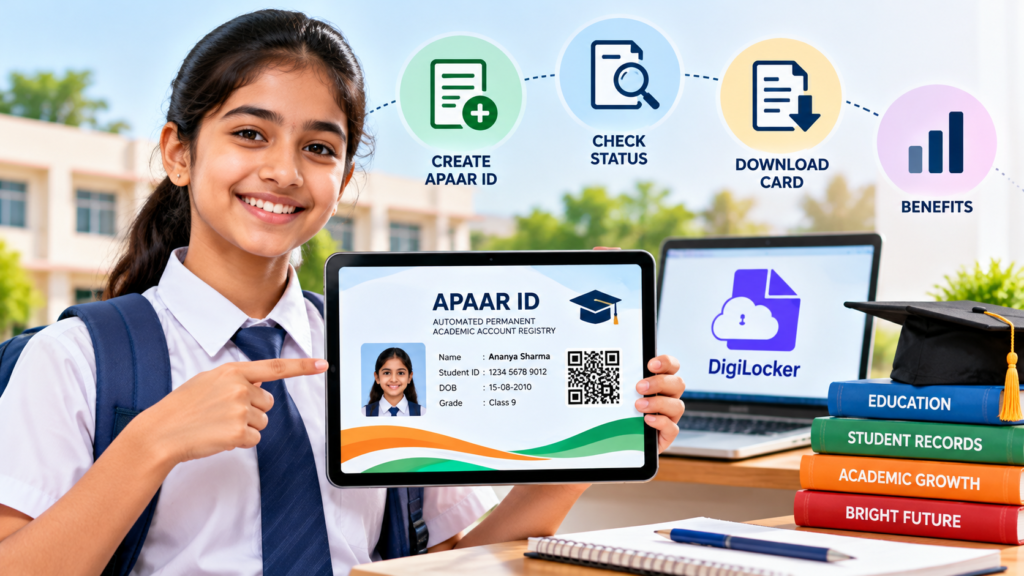
What Is APAAR ID?
APAAR stands for Automated Permanent Academic Account Registry. It is an initiative of India’s Ministry of Education under the vision of One Nation, One Student ID, aligned with the National Education Policy 2020.
APAAR ID is a unique 12-digit identification number designed to help students digitally access and manage their academic records.
These records may include marksheets, grades, certificates, qualifications, academic credits, and other recognized learning achievements as they become available through the relevant education systems.
The APAAR ID is linked with the Academic Bank of Credits (ABC) framework and DigiLocker, which helps students access eligible digital documents.
For example, imagine a student moving from one school or educational institution to another. Having academic information available through connected digital systems can make it easier to retrieve and verify relevant records when required.
APAAR ID is intended to support this kind of academic continuity. It does not mean that every institution or organization will automatically accept the ID in place of every document; individual admission, examination, and recruitment requirements still apply.
Official website: APAAR Portal
What Is the Purpose of APAAR ID?
The main purpose of APAAR ID is to provide students with a consistent academic identity and make educational records easier to access, manage, and verify.
Traditionally, students and families may need to keep track of several marksheets, certificates, and other academic documents. Digital academic records can help reduce the difficulty of locating and sharing eligible records when needed.
APAAR is designed to support:
- Digital access to eligible academic records.
- Recognition of academic credits and achievements.
- Easier academic record verification.
- Better continuity when students move between educational institutions.
- Connections with the Academic Bank of Credits and DigiLocker.
- More convenient management of educational credentials.
The availability of particular records depends on the relevant institution, issuing authority, and digital systems.
Who Can Get an APAAR ID?
APAAR is designed for students across India’s education system. The way an ID is created can depend on the student’s age, educational level, institution, and the process available to them.
School students
For school students, APAAR ID creation is generally coordinated through the school. School authorities verify student information and handle the relevant registration process.
For a student who is a minor, parental or legal guardian consent is required for the school-based creation process.
College and university students
Students in higher education should follow the instructions provided by their college, university, or the official APAAR and Academic Bank of Credits systems. The process may differ from the school-based UDISE+ procedure.
Is APAAR ID compulsory?
Do not assume that every student must complete the process in exactly the same way or that the same rule applies to every institution.
Check the latest official instructions from your school, college, university, or the APAAR portal to understand the requirements that apply to you. Parents should read the consent information carefully before signing.
Official information: APAAR FAQs
Documents and Details Required for APAAR ID Registration
Before starting the process, make sure the student’s details are accurate. In the school-based process, the official APAAR FAQ lists student information such as the following:
- Student’s full name.
- Date of birth.
- Gender.
- Aadhaar details and name as recorded on Aadhaar.
- Student’s PEN, or Permanent Education Number, used in the UDISE+ system.
- Parent details, including the mother’s and father’s names.
- Mobile number and other details requested by the school.
The exact information requested may depend on the student’s circumstances and the official process being followed.
Why is matching information important?
The official APAAR FAQ states that the student’s name in the UDISE+ school records should match the name on Aadhaar. The student’s PEN is also required for generating an APAAR ID through the school-based system.
If the spelling of the student’s name, date of birth, or other details differs between records, ID generation may fail.
Check the details carefully before submitting the information. If you discover an error, ask the school which record needs to be corrected and follow the relevant official procedure.
Important: Never share a student’s Aadhaar number, OTP, password, or other sensitive information in public comments, social media posts, or with unofficial websites claiming to generate an APAAR ID.
How to Create APAAR ID for School Students
For school students, the official process generally involves the school verifying information and generating the ID through the relevant education system.
Follow these steps.
Step 1: Contact the school
Ask the school administration or class teacher about APAAR ID registration. They can explain the current procedure, the information required, and whether any consent form must be submitted.
Step 2: Verify the student’s information
Check the student’s name, date of birth, gender, parent details, Aadhaar information, and school records.
Make sure the information matches the relevant official records. In particular, check that the student’s name is consistent between Aadhaar and the UDISE+ school record.
Step 3: Submit parental consent if required
For a minor, the parent or legal guardian must provide consent for the school-based APAAR ID creation process.
Read the consent form before signing. If you have questions about how information will be used or shared, ask the school for clarification.
Step 4: School verification
The school verifies the student’s details and processes the request through the applicable system. A valid PEN is required for generation through the school-based UDISE+ process.
Step 5: APAAR ID generation
Once the information is verified and the request is successfully processed, the APAAR ID can be generated.
If the process fails because of a mismatch or another issue, the school may need to correct the details and submit the request again.
Step 6: Check DigiLocker
After successful generation, the APAAR ID is made available in the student’s DigiLocker account, according to the official APAAR guidance.
You can then look for the issued APAAR ID card or related academic document.
Official registration guidance: APAAR — Get Your APAAR
How to Check APAAR ID Status
If you have submitted the information but have not received the APAAR ID, do not immediately submit multiple requests through unofficial websites.
For school students, there are two main ways to follow up.
Method 1: Ask the school
Contact the school office or class teacher and ask whether the student’s APAAR ID has been generated.
According to the official APAAR FAQ, the school’s UDISE+ APAAR module can show the status of student ID generation. School authorities can check whether the request is pending, completed, or requires correction.
If there is a problem, ask the school which information needs to be corrected.
Method 2: Check DigiLocker
You can also check the student’s DigiLocker account to see whether the digital card has been issued.
- Visit the official DigiLocker website.
- Sign in to the appropriate account.
- Open the section for issued documents.
- Look for the APAAR ID card or relevant APAAR/ABC academic document.
- Open the document if it is available.
If the document is not visible, it does not necessarily mean that your request has been rejected. The ID may not have been generated yet, the document may not have been issued to that account, or further action may be needed.
Contact the school or the official support channel to clarify the status.
How to Download APAAR ID Card from DigiLocker
Once the APAAR ID card is available in DigiLocker, you can access the digital document.
Steps to download APAAR ID
Step 1: Open the official DigiLocker website or the official DigiLocker app.
Step 2: Sign in using the account associated with the student’s document.
Step 3: Go to the section displaying issued documents.
Step 4: Find the APAAR ID card or the relevant APAAR/ABC document.
Step 5: Open the document and look for the available download or save option.
Step 6: Save the document securely on your device if a download option is available.
The exact labels and screen layout may change as DigiLocker is updated.
If you cannot find the card, first confirm whether the APAAR ID has been generated. For a school student, ask the school to verify the status. Do not enter the student’s personal information on an unofficial website just because it claims to offer a faster download.
What Are the Benefits of APAAR ID?
APAAR ID is intended to make academic record management more convenient for students, parents, and educational institutions.
Here are some of its main potential benefits.
1. A unique academic identity
APAAR provides a unique 12-digit academic identifier intended to remain associated with the student throughout their educational journey.
This can help connect eligible academic records across relevant digital education systems.
2. Easier access to academic records
APAAR is connected with digital academic record systems, including DigiLocker and the Academic Bank of Credits framework.
This can make it more convenient to access eligible records without relying entirely on paper copies.
3. Support for academic mobility
Students sometimes move between institutions or continue their studies at a different educational level.
Connected academic records can help institutions retrieve and verify relevant information, subject to the applicable systems and procedures.
4. Academic credit management
The Academic Bank of Credits framework supports the accumulation and transfer of eligible academic credits under the applicable rules.
APAAR is designed to work with this wider digital academic ecosystem. Students should still check the rules of their university or institution before assuming that a particular credit can be transferred.
5. Easier document verification
Digital academic records can make verification more convenient where an institution or organization supports the relevant system.
However, students may still be asked to provide specific documents, certificates, or additional information for admissions, examinations, scholarships, or employment.
6. Recognition of learning achievements
APAAR is intended to help maintain a more connected record of eligible academic achievements and qualifications.
The records available depend on what the relevant institution or issuing authority provides through the connected systems.
Difference Between APAAR ID and ABC ID
People sometimes use APAAR ID and ABC ID interchangeably, but it is useful to understand their roles.
| Feature | APAAR ID | ABC ID |
|---|---|---|
| Full form | Automated Permanent Academic Account Registry | Academic Bank of Credits identification |
| Main role | Student’s academic identity within the APAAR initiative | Identification associated with the Academic Bank of Credits framework |
| Purpose | Supports connected academic records and achievements | Supports academic credit management under applicable rules |
| Digital ecosystem | Connected with education record systems and DigiLocker | Linked to the Academic Bank of Credits system |
| Who should verify requirements? | School, college, university, or official APAAR guidance | Institution and official ABC guidance |
The two are connected within India’s digital education ecosystem, but they should not be assumed to be identical in every context.
For official information, visit the APAAR portal and the Academic Bank of Credits portal.
What to Do If APAAR ID Registration Fails
Sometimes an APAAR ID request cannot be completed on the first attempt. A failed request does not automatically mean the student is ineligible.
Consider these steps.
Check the student’s name
Compare the student’s name in Aadhaar with the name in school records. If the names do not match, ask the school which record needs correction.
Confirm the PEN
For school-based generation through UDISE+, the student’s PEN is required. Ask the school to verify that the correct identifier is recorded.
Review the other details
Check the date of birth, gender, parent details, and any other required information for errors.
Ask the school to check the status
The school can review the status in the relevant UDISE+ APAAR module and explain whether any correction or further action is needed.
Use official support
For unresolved questions, visit the official APAAR portal and use its available contact or support information.
Avoid paying an unknown agent or sharing personal details with an unofficial service promising guaranteed or instant APAAR ID generation.
Is APAAR ID Safe? What Should Parents Know?
APAAR is an official education initiative, but parents should still understand the information being requested and use only trusted channels.
Before providing information:
- Read the consent form and ask questions if anything is unclear.
- Verify that the request comes from the school or an official government service.
- Do not post Aadhaar numbers, the full APAAR ID, or other sensitive details publicly.
- Never share account passwords or one-time passwords with strangers.
- Use the official APAAR and DigiLocker websites rather than lookalike websites.
- Ask the school how to correct inaccurate records or raise a concern about the process.
For school students who are minors, parental or legal guardian consent is part of the school-based creation process. Parents should read the current consent information carefully before signing.
Official resources and consent information are available through the APAAR resources page.
Frequently Asked Questions About APAAR ID
1. What is the full form of APAAR ID?
APAAR stands for Automated Permanent Academic Account Registry. It is part of the One Nation, One Student ID initiative in India.
2. How many digits are there in APAAR ID?
APAAR ID is a unique 12-digit academic identifier.
3. How can I create APAAR ID for my child?
For a school student, contact the school, verify the student’s details, submit the required parental consent, and follow the school’s verification and registration process.
4. Can I create APAAR ID at home?
The process depends on the student’s age and educational level. School students, particularly minors, generally need to follow the school-based process. Higher education students should follow the official instructions applicable to their institution and the APAAR/ABC systems.
5. How can I check APAAR ID status?
For a school student, ask the school to check the status through the UDISE+ APAAR module. You can also look in the student’s DigiLocker issued documents after the ID has been generated.
6. How can I download APAAR ID?
Sign in to the relevant DigiLocker account, open the issued documents section, locate the APAAR ID card or related document, and use the available download option.
7. What should I do if APAAR ID is not showing in DigiLocker?
First ask the school whether the ID has been generated. If it has, verify that you are checking the appropriate DigiLocker account and document section. Contact official support if the issue remains unresolved.
8. Is Aadhaar required for APAAR ID?
Aadhaar information is part of the requirements listed in the official FAQ for school-based APAAR ID generation. Follow the current official instructions and ask your school how to handle any mismatch or verification issue.
9. Is parental consent required for APAAR ID?
For minors following the school-based creation process, parental or legal guardian consent is required. Parents should read the current consent form and ask the school about the procedure.
10. What is the difference between APAAR ID and DigiLocker?
APAAR ID is an academic identifier. DigiLocker is a digital platform used to access and store eligible issued documents. They are connected, but they serve different purposes.
11. Does APAAR ID replace marksheets and certificates?
APAAR helps connect and access eligible academic records, but students should not assume it replaces every original document or every requirement set by an institution. Follow the instructions of the organization requesting the documents.
12. Is APAAR ID the same as ABC ID?
APAAR and ABC are connected within the digital education ecosystem but have different roles. APAAR provides an academic identity, while the Academic Bank of Credits framework supports the management of eligible academic credits.
13. What should I do if my child’s details are incorrect?
Contact the school and ask which record must be corrected. Make sure the information is consistent across the relevant official records before the request is processed again.
14. Where can I find the official APAAR website?
The official website is https://apaar.education.gov.in/. You can find FAQs, registration guidance, resources, and official updates there.
Final Words
APAAR ID is an important part of India’s move towards more connected digital academic records. It is designed to give students a unique academic identity and make it easier to access eligible educational achievements through connected systems.
For school students, the most practical first step is to contact the school and confirm that the student’s details are accurate. Parents should carefully review the consent form, follow the official process, and check DigiLocker after the ID has been generated.
If the ID is delayed or missing, ask the school to verify the status before submitting another request. Using official sources and keeping personal information secure can help make the process smoother.
Disclaimer: This article is for general informational purposes. APAAR procedures and system features may change. Always verify current eligibility, consent requirements, and registration instructions through the official APAAR portal or your educational institution.
SHARING IS CARING 💖